livox mid-40 failed to start sampling #4

Closed
opened 2019-02-01 19:53:19 +01:00 by CaptD · 11 comments
CaptD commented 2019-02-01 19:53:19 +01:00 (Migrated from github.com)

Hi, I just received the livox mid-40 lidar. I followed the instructions to connect the lidar and my laptop to the same router via ethernet. The lidar is powered by a power supply and the sync wire is not plugged in. However, there is no pointcloud data.

I tried both linux 16.04 and windows livox viewer, and they both failed. Screenshots are attached. How can I diagnose this issue?

img_8181
img_8182

Thanks.

Hi, I just received the livox mid-40 lidar. I followed the instructions to connect the lidar and my laptop to the same router via ethernet. The lidar is powered by a power supply and the sync wire is not plugged in. However, there is no pointcloud data. I tried both linux 16.04 and windows livox viewer, and they both failed. Screenshots are attached. How can I diagnose this issue? ![img_8181](https://user-images.githubusercontent.com/6431176/52143136-b47aba00-2628-11e9-9f99-7fd60eb00373.JPG) ![img_8182](https://user-images.githubusercontent.com/6431176/52143137-b47aba00-2628-11e9-9115-07276ebc3ba5.JPG) Thanks.
Livox-SDK commented 2019-02-02 02:55:26 +01:00 (Migrated from github.com)

NOTE: Please replace the broadcast code lists in the main.c for both LiDAR sample and Hub sample with the broadcast code of your devices before running. You can find the following code section in main.c:

#define BROADCAST_CODE_LIST_SIZE 3
char *broadcast_code_list[BROADCAST_CODE_LIST_SIZE] = {
"00000000000002",
"00000000000003",
"00000000000004"
};

NOTE: Please replace the broadcast code lists in the main.c for both LiDAR sample and Hub sample with the broadcast code of your devices before running. You can find the following code section in main.c: #define BROADCAST_CODE_LIST_SIZE 3 char *broadcast_code_list[BROADCAST_CODE_LIST_SIZE] = { "00000000000002", "00000000000003", "00000000000004" };
Livox-SDK commented 2019-02-02 03:34:47 +01:00 (Migrated from github.com)

Power supply may be insufficient,it‘s recommended to use a more powerful power supply!
Thanks!

Power supply may be insufficient,it‘s recommended to use a more powerful power supply! Thanks!
CaptD commented 2019-02-02 03:37:48 +01:00 (Migrated from github.com)

Thanks for quick response. Will try both later and come back to follow up.

Thanks for quick response. Will try both later and come back to follow up.
Livox-SDK commented 2019-02-02 03:45:16 +01:00 (Migrated from github.com)

CaptD,the voltage is between 12v and 14v!

CaptD,the voltage is between 12v and 14v!
CaptD commented 2019-02-02 03:57:39 +01:00 (Migrated from github.com)

Got it. I used a power supply, and tried 12 and 16v. Still no help..

Got it. I used a power supply, and tried 12 and 16v. Still no help..
Livox-SDK commented 2019-02-02 04:24:54 +01:00 (Migrated from github.com)

Please check in these steps:
1、 Check the power supply to MID-40, 12V @ 5A is recommended.
2、 Connect the MID-40 by viewer, Check the "Device Manager " , select the device then click the “ V ” on the right.
3、 if “Initializing state” shown, please wait a few seconds until "Normal state". MID-40 can not start sample when it's initializing.
4、if other words shown, could you please post them here, or send an e-mail to us dev@livoxtech.com?

Please check in these steps: 1、 Check the power supply to MID-40, 12V @ 5A is recommended. 2、 Connect the MID-40 by viewer, Check the "Device Manager " , select the device then click the “ V ” on the right. 3、 if “Initializing state” shown, please wait a few seconds until "Normal state". MID-40 can not start sample when it's initializing. 4、if other words shown, could you please post them here, or send an e-mail to us dev@livoxtech.com?
CaptD commented 2019-02-10 19:57:20 +01:00 (Migrated from github.com)

capture
Hi. I followed your instructions, and there are points now. However, the points detected have a weird pattern, shown in the picture above. And on left, the status is warning 0x40000040....

![capture](https://user-images.githubusercontent.com/6431176/52538023-7de52380-2d3b-11e9-9a1e-a9e62db2ef28.PNG) Hi. I followed your instructions, and there are points now. However, the points detected have a weird pattern, shown in the picture above. And on left, the status is warning 0x40000040....
Livox-SDK commented 2019-02-11 06:51:52 +01:00 (Migrated from github.com)

dirty blocked
Hi,CaptD, please remove the protective film on the optical windows,this may be the cause of warning!

![dirty blocked](https://user-images.githubusercontent.com/45850995/52547334-f57d8600-2e01-11e9-9fe4-da4a03adce2f.png) Hi,CaptD, please remove the protective film on the optical windows,this may be the cause of warning!
Livox-SDK commented 2019-02-11 07:03:17 +01:00 (Migrated from github.com)
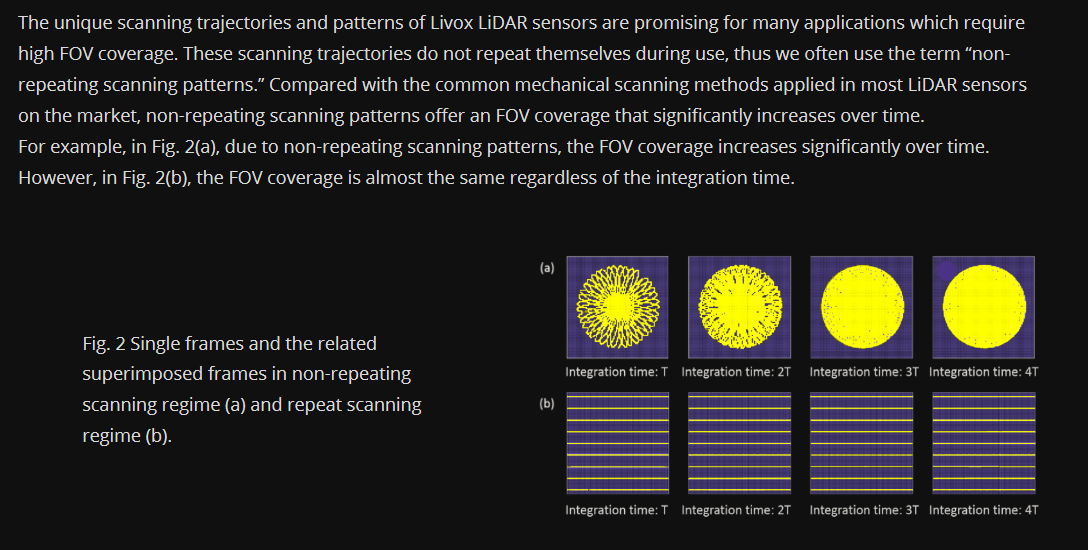
About the pointcloud pattern,you can referrence this document: https://www.livoxtech.com/3296f540ecf5458a8829e01cf429798e/downloads/Point%20cloud%20characteristics.pdf ![pattern](https://user-images.githubusercontent.com/45850995/52548038-2c559b00-2e06-11e9-8843-e452693271f5.png)
CaptD commented 2019-02-11 17:12:55 +01:00 (Migrated from github.com)

Thanks a lot. The warning is gone after I removed the protective screen. As for the point cloud pattern, I carefully read the doc you shared. My understanding is that this is an expected phenomenon, and we need to filter out the pattern points during post process by filtering out near distance points. Is my understanding correct?

Thanks a lot. The warning is gone after I removed the protective screen. As for the point cloud pattern, I carefully read the doc you shared. My understanding is that this is an expected phenomenon, and we need to filter out the pattern points during post process by filtering out near distance points. Is my understanding correct?
CaptD commented 2019-02-11 17:42:15 +01:00 (Migrated from github.com)

Sorry my previous understanding is wrong. Now I get it. And I got it working in Ubuntu 16.04 after updating broadcast ID. Thanks for your help~

Sorry my previous understanding is wrong. Now I get it. And I got it working in Ubuntu 16.04 after updating broadcast ID. Thanks for your help~
This repo is archived. You cannot comment on issues.
1 Participants
Due Date
No due date set.
Dependencies

No dependencies set.

Reference: mmr/Livox-SDK#4